2018年8月28日 星期二

自然語言處理(NLP)_詞性標註

詞性標註

       透過NLP界經典的Python Library-NLTK,來協助標注文中的詞性。先把Python的開發環境建好,並使用可開發Python的 Jupyter Notebook 工具(Jupyter Notebook從這裡下載)

參考開發環境:

  • virtualenv 15.1.0 (創建一個虛擬環境 (virtual environment),這是一個獨立的資料夾,並且裡面裝好了特定版本的 Python,以及一系列相關的套件。)
  • python 3.6.0
  • pip 19.1.1
  • 請安裝NLTK(可以pip install nltk)套件

NLTK (aka Natural Language ToolKit,是自然語言工具箱),是2001年就持續更新的一個強大NLP Python library(用作練習工具綽綽有餘)。

在NLTK上有許多手動進行詞性標注的文集了。本次使用Penn Treebank文集(the Penn Treebank Corpus)以及Brown文集(the Brown Corpus)。其中Penn Treebank中搜集了許多華爾街日報的文章(Wall Street Journal),而Brown中多數的文字和文學有關。在以下這格中我們下載Penn Treebank以及Brown這兩個文集,並且測試了這兩個文集中的第一個句子。".tagged_sents()"提取了詞性標註過的句子(sents = sentences)。

import nltk

from nltk.corpus import treebank, brown
nltk.download('treebank')
nltk.download('brown')
print(treebank.tagged_sents()[0])
print(brown.tagged_sents()[0])

https://ithelp.ithome.com.tw/upload/images/20190904/20118683cWEfn1pCQD.png


在NLTK中,文字和標註的組合是以tuple的方式儲存的。然而在實作上,詞性標註常以"word/tag"的方式顯示,例如"Pierre/NNP", "the/DT"。NNP是指專有名詞、DT則為定冠詞,完整的標籤列表大家可以參考:https://www.ling.upenn.edu/courses/Fall_2003/ling001/penn_treebank_pos.html 。
值得注意的是,這兩個文集並不是使用相同的標註方式。同樣是"the",Brown把它標註成"AT"(Article,冠詞),而在Penn Treebank中則被標註為"DT(Determiner,定冠詞)。好消息是,在NLTK中也可以把他們都轉換成Universal標註方式。https://universaldependencies.org/u/pos/ 。

import nltk
nltk.download('universal_tagset')
print(treebank.tagged_sents(tagset="universal")[0])
print(brown.tagged_sents(tagset="universal")[0])

https://ithelp.ithome.com.tw/upload/images/20190904/20118683TlTEqn0t1G.png

知道詞性標註的基本規則之後,開始開發一個Unigram Tagger。首先,我們需要先記錄每一個字形是出現各種詞性的頻率。我們可以將它存在python資料結構的dict中dict(事實上這不是最有效率的存法 :D)。雖然前面也介紹Brown Corpus,但從這邊開始我們專注於使用Penn Treebank的標籤規則。

from collections import defaultdict

POS_dict = defaultdict(dict)
for word_pos_pair in treebank.tagged_words():
    word = word_pos_pair[0].lower() # 正規化成小寫
    POS = word_pos_pair[1]
    POS_dict[word][POS] = POS_dict[word].get(POS,0) + 1

取一些字來看看他們怎麼表現多個詞性標註,以及每個詞性在文集中的分布狀況:

for word in list(POS_dict.keys())[900:1000]:
    if len(POS_dict[word]) > 1:
        print(word)
        print(POS_dict[word])

結果會如同這張圖所顯示:
觀察到一些常見的歧義會發生在名詞和動詞之間(plansdeclinecost);在動詞之間,過去式和過去分詞也會發生同樣的問題(announcedofferedspent).

為了開發出第一個標註器(Unigram Tagger),只需要為每個詞選出最常見的詞性。

tagger_dict = {}
for word in POS_dict:
    tagger_dict[word] = max(POS_dict[word],key=lambda x: POS_dict[word][x])

def tag(sentence):
    return [(word,tagger_dict.get(word,"NN")) for word in sentence]

example_sentence = """You better start swimming or sink like a stone , cause the times they are a - changing .""".split() 
print(tag(example_sentence))

https://ithelp.ithome.com.tw/upload/images/20190904/20118683kBrKaL1VnJ.png
因為不是每一個字都是在training set中看過的字,所以遇到沒有看過的字,會自動標註成名詞"NN"。我們可以觀察到這樣的方法雖然會有一些問題,例如"swimming"在該是動詞,卻因此被標註成了名詞。然而總體而言,這樣標註的成效還挺不錯的。

NLTK也有內建的N-gram tagger,可以使用內建的Unigram(1-gram)和Bigram(2-gram) Tagger。

首先,需要將文集切割成訓練集和測試集。

# 訓練集:測試集 = 9:1
size = int(len(treebank.tagged_sents()) * 0.9)
train_sents = treebank.tagged_sents()[:size] 
test_sents = treebank.tagged_sents()[size:]

先來比對預設的Unigram和Bigram Tagger。NLTK裡面所有的標註器都有評價功能,藉此回傳測試集運行在這個訓練模型的準確率(accuracy)。

from nltk import UnigramTagger, BigramTagger

unigram_tagger = UnigramTagger(train_sents)
bigram_tagger = BigramTagger(train_sents)
print(unigram_tagger.evaluate(test_sents))
print(unigram_tagger.tag(example_sentence))
print(bigram_tagger.evaluate(test_sents))
print(bigram_tagger.tag(example_sentence))

https://ithelp.ithome.com.tw/upload/images/20190904/201186837YdAJ4pRLY.png
在這裡Unigram Tagger的效果好太多了。原因很明顯,因為Bigram Tagger並沒有足夠的資料來觀察前後文的關係;更糟的是,一旦一個詞的詞性判斷被判定成"None",後面整句話也都會失敗。

為了解決問題,需要為Bigram Tagger加上退避(backoffs)。關於backoffs,這是關於N-gram語言模型和Smoothing的問題,目前先不說明,現在就先預設那些"None"的字為"NN"。

from nltk import DefaultTagger

default_tagger = DefaultTagger("NN")
unigram_tagger = UnigramTagger(train_sents,backoff=default_tagger)
bigram_tagger = BigramTagger(train_sents,backoff=unigram_tagger)

print(bigram_tagger.evaluate(test_sents))
print(bigram_tagger.tag(example_sentence))

https://ithelp.ithome.com.tw/upload/images/20190904/201186835iRcrFlft8.png
藉由退避方法,我們將Bigram的資訊加到Unigram之上,準確率也有了3%的提升。

自然語言處理(NLP)_檢索系統之索引壓縮


自然語言處理(NLP)_檢索系統之索引壓縮

實作倒排索引的空間壓縮,會利用VByte壓縮法壓縮倒排索引中的文件ID doc_ids 以及文件-詞頻列表 doc_term_freqs 。

利用Vbyte壓縮和解壓縮的演算法開發成以下兩個方法:

  • vbyte_encode(num):接受一個數字,回傳相對該數字的Vbyte壓縮。
  • vbyte_decode(input_bytes, idx):接受一組Vbyte壓縮(可能是多個位元組,根據Continuation Bit來決定有幾個bytes),回傳解壓縮後的數字。
def vbyte_encode(num):

    # out_bytes 儲存轉換成Vbyte壓縮後的格式
    out_bytes = []
    
    while num >= 128:
        out_bytes.append(int(num) % 128)
        num /= 128
        
    out_bytes.append(int(num) + 128)
    
    return out_bytes


def vbyte_decode(input_bytes, idx):
    
    x = 0 # 儲存解壓縮後的數字
    s = 0
    consumed = 0 # 記錄花了多少位元組來解壓這個數字
    
    while input_bytes[idx + consumed] < 128:
        x ^= (input_bytes[idx + consumed] << s)
        s += 7
        consumed += 1
    
    x ^= ((input_bytes[idx + consumed]-128) << s)
    consumed += 1
    
    return x, consumed

單元測試壓縮和解壓縮過程正確性:

for num in range(0, 123456):
    vb = vbyte_encode(num)
    dec, decoded_bytes = vbyte_decode(vb, 0)
    assert(num == dec)
    assert(decoded_bytes == len(vb))

正確地開發了VByte壓縮和解壓縮之後,來修正原本的 InvertedIndex 類別以支援VByte壓縮。需要注意的是, doc_ids 的部份是要壓縮文件ID之間的間隔而不是文件ID本身。還寫了一個輔助方法 decompress_list 來幫助我們更簡單地將列表解壓縮。

def decompress_list(input_bytes, gapped_encoded):
    res = []
    prev = 0
    idx = 0
    while idx < len(input_bytes):
        dec_num, consumed_bytes = vbyte_decode(input_bytes, idx)
        idx += consumed_bytes
        num = dec_num + prev
        res.append(num)
        if gapped_encoded:
            prev = num
    return res

class CompressedInvertedIndex:
    def __init__(self, vocab, doc_term_freqs):
        self.vocab = vocab
        self.doc_len = [0] * len(doc_term_freqs)
        self.doc_term_freqs = [[] for i in range(len(vocab))]
        self.doc_ids = [[] for i in range(len(vocab))]
        self.doc_freqs = [0] * len(vocab)
        self.total_num_docs = 0
        self.max_doc_len = 0
        for docid, term_freqs in enumerate(doc_term_freqs):
            doc_len = sum(term_freqs.values())
            self.max_doc_len = max(doc_len, self.max_doc_len)
            self.doc_len[docid] = doc_len
            self.total_num_docs += 1
            for term, freq in term_freqs.items():
                term_id = vocab[term]
                self.doc_ids[term_id].append(docid)
                self.doc_term_freqs[term_id].append(freq)
                self.doc_freqs[term_id] += 1

                # 壓縮文件ID之間的間隔
        for i in range(len(self.doc_ids)):
            last_docid = self.doc_ids[i][0]
            for j in range(len(self.doc_ids[i])):
                if j != 0:
                    ori_docid = self.doc_ids[i][j]
                    self.doc_ids[i][j] = vbyte_encode(self.doc_ids[i][j] - last_docid)
                    last_docid = ori_docid
                else:
                    self.doc_ids[i][0] = vbyte_encode(last_docid)
            self.doc_ids[i] = sum(self.doc_ids[i], [])

        # 根據詞頻壓縮
        for i in range(len(self.doc_term_freqs)):
            for j in range(len(self.doc_term_freqs[i])):
                self.doc_term_freqs[i][j] = vbyte_encode(self.doc_term_freqs[i][j])
            self.doc_term_freqs[i] = sum(self.doc_term_freqs[i], [])

    def num_terms(self):
        return len(self.doc_ids)

    def num_docs(self):
        return self.total_num_docs

    def docids(self, term):
        term_id = self.vocab[term]
        # 解壓縮
        return decompress_list(self.doc_ids[term_id], True)

    def freqs(self, term):
        term_id = self.vocab[term]
        # 解壓縮
        return decompress_list(self.doc_term_freqs[term_id], False)

    def f_t(self, term):
        term_id = self.vocab[term]
        return self.doc_freqs[term_id]

        def space_in_bytes(self):
        # 這裡現在假設數字都是位元組型態
        space_usage = 0
        for doc_list in self.doc_ids:
            space_usage += len(doc_list)
        for freq_list in self.doc_term_freqs:
            space_usage += len(freq_list)
        return space_usage


compressed_index = CompressedInvertedIndex(vocab, doc_term_freqs)

print("documents = {}".format(compressed_index.num_docs()))
print("unique terms = {}".format(compressed_index.num_terms()))
print("longest document = {}".format(compressed_index.max_doc_len))
print("compressed space usage MiB = {:.3f}".format(compressed_index.space_in_bytes() / (1024.0 * 1024.0)))

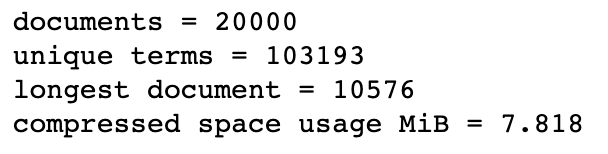
https://ithelp.ithome.com.tw/upload/images/20190913/20118683fuEtRjGBdF.png

在資料不變的情況下,我們的空間使用已經從58.187MiB降到了7.818MiB。
最後,我們來測試原本的倒排索引及VByte壓縮後的倒排索引結果有沒有改變(理論上結果該相同)。

# 確認是否和先前結果相同
query = "south korea production"
stemmed_query = nltk.stem.PorterStemmer().stem(query).split()
comp_results = query_tfidf(stemmed_query, compressed_index)
for rank, res in enumerate(comp_results):
    print("排名 {:2d} DOCID {:8d} SCORE {:.3f} 內容 {:}".format(rank+1,res[0],res[1],raw_docs[res[0]][:75]))

https://ithelp.ithome.com.tw/upload/images/20190913/20118683Tx46TVUwOD.png

不論DocID排名或是TF-IDF分數都沒有改變,壓縮結果正確。

2018年8月27日 星期一

自然語言處理(NLP)_Google索引壓縮


 自然語言處理(NLP)_Google索引壓縮

多數搜尋引擎為了查詢的效率,會將索引儲存在記憶體當中。如此,需要足夠的記憶體才能夠將所有索引儲存起來。如果我們能夠從索引的資料型態中壓縮,便可以減少硬體需求,因此人們開始思考如何壓縮索引,讓更多部分可以存在記憶體中,以達到有效率的查詢。

一種做法稱為變數位元壓縮(Variable Byte Compression),從我們倒排索引的Posting List下手,壓縮的方法主要為:

  1. 原本存的是擁有一個字詞的所有doc ID,我們0改成存doc ID之間的間隔。舉例來說,有字詞”hello”的文件ID有:1000000, 1000001, 1000002...等;若改存間隔,變成只要存1000000, 1, 1,若數字夠大,這麼做可以達到省下一些位元組的效果。
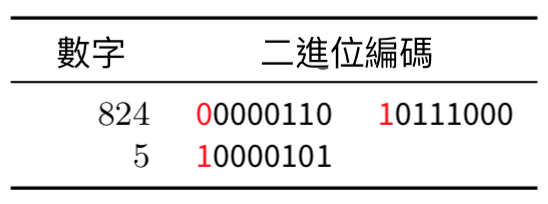
  2. 將數字變數以位元組的方式儲存,第一個位元作為「繼續」位元(Continuation bit),剩餘七個位元為「負載」(payload),就如下圖:紅字為繼續位元,為1表示沒有下一個位元組了。

https://ithelp.ithome.com.tw/upload/images/20190912/201186832BcSgt76Ok.png

第一行電腦讀到0000110 10111000 = 2^9 + 2^8 + 2^5 + 2^4 + 2^3 = 824

第二行讀到10000101 = 2^2 + 2^0 = 5

https://ithelp.ithome.com.tw/upload/images/20190912/20118683XOioYTSWs2.png

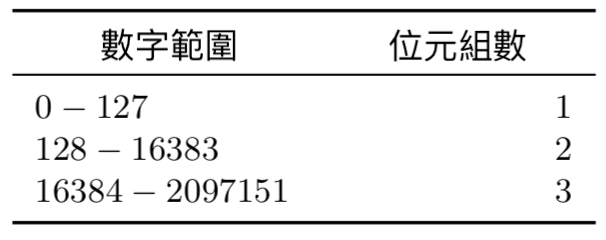
而儲存文件ID的間隔而非文件本身的好處也如上圖,可以減少位元組的數量,達到空間壓縮的效果。

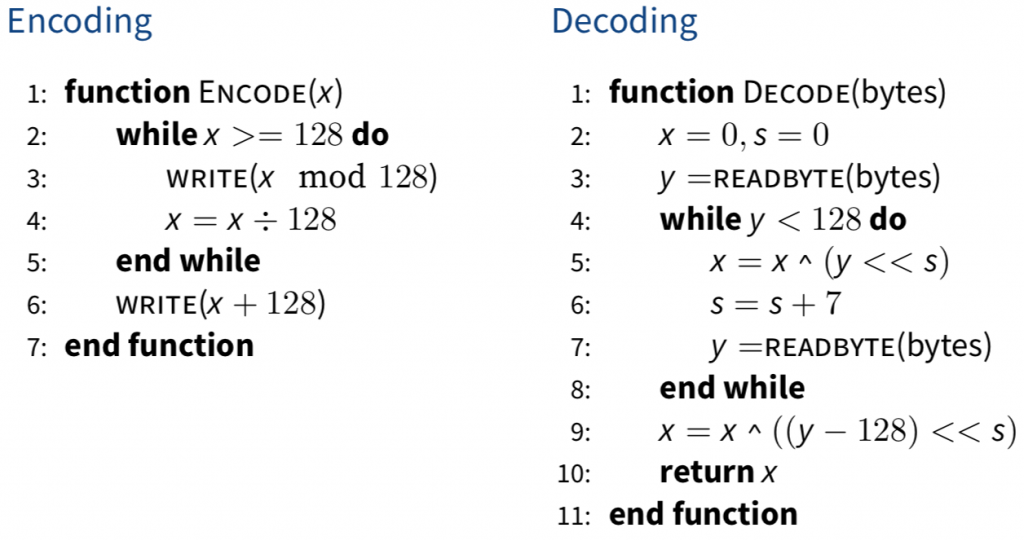
附上Variable Bytes Compression的加解密演算法。

https://ithelp.ithome.com.tw/upload/images/20190912/20118683urU9AUh25M.png    

2018年8月25日 星期六

自然語言處理(NLP)_ TF-IDF 文件加權

 自然語言處理(NLP)_ TF-IDF 文件加權

在搜尋技術中TF-IDF是個很基礎而重要的統計方式。TF-IDF的全名是Term Frequency - Inverted Document Frequency,大概可以翻作詞頻-倒文件頻(維基百科上面也直接寫TF-IDF)。它的統計結果能夠直觀地呈現一個詞在整個文集的某一個檔案中佔有怎麼樣的重要性。有些詞很少出現在整個文集的其他文件中,卻頻繁的出現在其中一個文件裡,那我們大概可以猜到這個字這份文件的關鍵字。另一面,有些詞(例如中文的「的、我」)頻繁的出現在文集中的每個文件裡,那麼說明這個詞並沒有什麼顯著性,因為大家都有。照著TF-IDF字面上的意思我們大略能夠明白,這個統計方法會取兩個值的乘積:

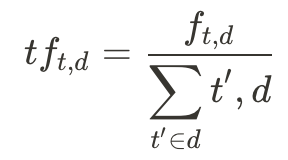
(1) 詞頻(TF),一個詞出現在一個文件的頻率或次數,其中我們想知道字詞t在文件d中的詞頻,我們就可以取分子 - t出現在d中的次數(frequency)以及分母 - 所有字詞出現在d的次數(也就是文件長度)。例如某篇文章總共有100個字詞,如果我們想知道rock在這個文章中的詞頻,而rock總共出現了3次,那麼詞頻就會是 (3/100 = 0.03)。

https://ithelp.ithome.com.tw/upload/images/20190911/20118683i0eWcSmtQ7.png

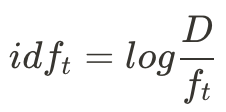
(2) 倒文件頻(IDF),所有文件中含有這個詞之數量的倒數;實務上通常會取一個log。倒數前的document frequency(也就d_t / D)中,分子計算了包含文件中出現過字詞t的文件數量,分母則是所有文件的總數;將其倒數後就成了idf。舉例來說,整個文集裡面有10篇文章,其中出現rock這個詞的文中有2篇,那麼df就是 (2/10 = 0.2),而未取log前的idf就是 (10/2 = 5)。

https://ithelp.ithome.com.tw/upload/images/20190911/201186830ljuTQPxvY.png ,其中 https://ithelp.ithome.com.tw/upload/images/20190911/20118683aKkrUEhLsT.png

我們再根據昨天下載和預處理過的資料,以及寫好的倒排索引來實作TF-IDF:
我們現在根據Day 9中開發的 InvertedIndex 類別來計算文件和查詢Q之間的TF-IDF相似度。
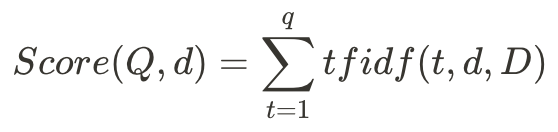
在這裡,我們使用簡易版的TF-IDF相似度計算公式:

https://ithelp.ithome.com.tw/upload/images/20190911/20118683W9rIcgW0fX.png

https://ithelp.ithome.com.tw/upload/images/20190911/20118683yKQhxORh8g.png

其中Q指的是我們的查詢,包含了多個查詢字q。這些資料都是我們在 InvertedIndex 類別中預先存好的。我們再繼續用剛剛rock的例子:假如我們的查詢中只包含一個字rock,那麼我們的tfidf值就是 tfidf = 0.03 * log(5) = 0.03 * 0.7 = 0.021。這個數字可以說明rock這個詞在這份文件中並不顯著。若在查詢中有多個詞的話,我們會把每個字詞的tfidf加總作為分數。

我們的 query_tfidf function中輸入一句查詢以及一個索引類別,最後回傳 top-k TF-IDF分數最高的文件。

from math import log, sqrt

# 給定一個查詢(String)和一個索引(Class),回傳k個文件
def query_tfidf(query, index, k=10):

    # scores 儲存了docID和他們的TF-IDF分數
    scores = Counter()

    N = index.num_docs()

    for term in query:
        i = 0
        f_t = index.f_t(term)
        for docid in index.docids(term):
            # f_(d,t)
            f_d_t = index.freqs(term)[i]
            d = index.doc_len[docid]
            tfidf_cal = log(1+f_d_t) * log(N/f_t) / sqrt(d)
            scores[docid] += tfidf_cal
            i += 1

    return scores.most_common(k)

# 查詢語句
query = "south korea production"
# 預處理查詢,為了讓查詢跟索引內容相同
stemmed_query = nltk.stem.PorterStemmer().stem(query).split()
results = query_tfidf(stemmed_query, invindex)
for rank, res in enumerate(results):
    # e.g 排名 1 DOCID 176 SCORE 0.426 內容 South Korea rose 1% in February from a year earlier, the
    print("排名 {:2d} DOCID {:8d} SCORE {:.3f} 內容 {:}".format(rank+1,res[0],res[1],raw_docs[res[0]][:75]))

TF-IDF本身是個很簡潔而直觀的公式,不過在實務上多數會選擇使用TF-IDF的改良版:BM25。核心不變,但BM25增加了一些參數以達到Smoothing平滑的效果

自然語言處理(NLP)_檢索系統之倒排索引


自然語言處理(NLP)_檢索系統之倒排索引


一、 預處理

使用華爾街日報的的文件集,預先將文件集切割成只有兩萬份文件的集合,這份文件集能夠從以下的code中下載。將每一行視為一份文件來處理(利用NLTK工具來記號化和正規劃)。

import requests
from pathlib import Path

fname = 'wsta_col_20k.gz'
my_file = Path(fname)
if not my_file.is_file():
    url = 'https://hyhu.me/resources/' + fname
    r = requests.get(url)

    # Save to the current directory
    with open(fname, 'wb') as f:
        f.write(r.content)

來測試下載的結果,讀讀看第一行(第一份文件)。

import gzip

raw_docs = []
with gzip.open(fname, 'rt') as f:
    for raw_doc in f:
        raw_docs.append(raw_doc)

print(len(raw_docs))
print(raw_docs[0])

https://ithelp.ithome.com.tw/upload/images/20190910/20118683rHnFWexy1q.png

接著,開始預處理。可以先用NLTK的工具word_tokenize來記號化每份文件,接著使用PorterStemmer來stem小寫化(lowercase)各文件,並且把這些正規化後的字彙加上Unique ID存進Python的dict資料型態,所有的字彙M有自己的字彙ID[0..M−1]。這過程可能需要幾分鐘。

import nltk

# 感謝thwu的提醒,這邊需要下載`punkt`以及宣告`stemmer`
nltk.download('punkt')
stemmer = nltk.stem.PorterStemmer()

# processed_docs 儲存預處理過的文件列表
processed_docs = []
# vocab 儲存(term, term id)組合
vocab = {}
# total_tokens 儲存總共字數(不是字彙量,而是記號總量)
total_tokens = 0

for raw_doc in raw_docs:
    
    # norm_doc 儲存正規化後的文件
    norm_doc = []
    
    # 使用word_tokenize
    tokenized_document = nltk.word_tokenize(raw_doc)
    for token in tokenized_document:
        stemmed_token = stemmer.stem(token).lower()
        norm_doc.append(stemmed_token)

        total_tokens += 1
        
        # 將正規化後的字彙存進vocab (不重複存同樣字型的字彙)
        if stemmed_token not in vocab:
            vocab[stemmed_token] = len(vocab)
            
    processed_docs.append(norm_doc)

print("Number of documents = {}".format(len(processed_docs)))
print("Number of unique terms = {}".format(len(vocab)))
print("Number of tokens = {}".format(total_tokens))

https://ithelp.ithome.com.tw/upload/images/20190910/20118683Vvm0avk8ey.png

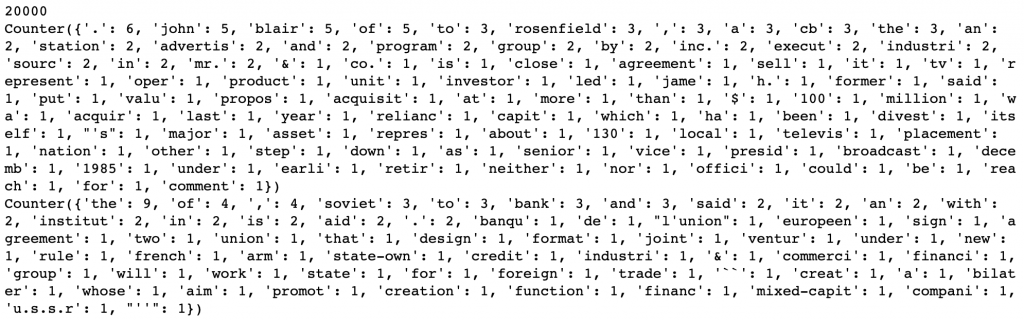
接著,使用Python的Counter來計算每個文件的詞頻。將每個字彙當作key,它的詞頻當作value。最後將所有文件各自的Counter存進doc_term_freqs列表中。

以一個Document為例:

the old night keeper keeps the keep in the town. in the big old house in the big old gown. The house in the town had the big old keep where the old night keeper never did sleep. The keeper keeps the keep in the night and keeps in the dark and sleeps in the light.

在經過記號化和stemming之後,它的Counter應該長這樣:

Counter({'the': 14, 'in': 7, 'keep': 6, 'old': 5, '.': 4, 'night': 3, 'keeper': 3, 'big': 3, 'town': 2, 'hous': 2, 'sleep': 2, 'and': 2, 'gown': 1, 'had': 1, 'where': 1, 'never': 1, 'did': 1, 'dark': 1, 'light': 1})

from collections import Counter

# doc_term_freqs 儲存每個文件分別的字彙及詞頻Counter
doc_term_freqs = []

for norm_doc in processed_docs:
    tfs = Counter()
    # 計算詞頻
    for token in norm_doc:
        tfs[token] += 1
    doc_term_freqs.append(tfs)

print(len(doc_term_freqs))
print(doc_term_freqs[0])
print(doc_term_freqs[100])

https://ithelp.ithome.com.tw/upload/images/20190910/20118683tmYLM690Ox.png

二、 倒排索引

再來就是我們的倒排索引,開發上我主要分成六個部分:

  1. 字彙表 vocab ,用以記錄字彙與其ID
  2. 每個文件的長度 doc_len
  3. doc_ids 是一個list,其中儲存了這個doc所包含的所有字彙的ID。is a list indexed by term IDs. For each term ID, it stores a list of document ids of all documents containing that term
  4. doc_term_freqs 是一個list,其中儲存了這個doc中相對應doc_ids的詞頻(就像Day 7中的第二個倒排索引)。每一個term ID都應該儲存著自己的文件-字彙詞頻列表(document term frequencies f_{d,t},這個列表說明了每個檔案 d 中各個字彙 t 分別出現的頻率 f
  5. doc_term_freqs 記錄了各個詞出現在每個文件的詞頻, 而 doc_freqs 則記錄各個詞總共出現在多少個文件中。這會跟我們明天所要說的TF-IDF有關。文件頻率(Document Frequency) ft 的記法是,只要他曾經出現過,ft 就會+1。
  6. 最後我存了兩個數字 total_num_docs 和 max_doc_len ,他們分別記錄了總共處理的文件數量(應該要是兩萬份)以及單一文件最長的長度

這裡有些儲存的資料並不是為了之後計算TF-IDF用的,而是一些方便我們驗證開發正確性的統計數字。

class InvertedIndex:
    def __init__(self, vocab, doc_term_freqs):
        self.vocab = vocab
        self.doc_len = [0] * len(doc_term_freqs)
        self.doc_term_freqs = [[] for i in range(len(vocab))]
        self.doc_ids = [[] for i in range(len(vocab))]
        self.doc_freqs = [0] * len(vocab)
        self.total_num_docs = 0
        self.max_doc_len = 0
        for docid, term_freqs in enumerate(doc_term_freqs):
            doc_len = sum(term_freqs.values())
            self.max_doc_len = max(doc_len, self.max_doc_len)
            self.doc_len[docid] = doc_len
            self.total_num_docs += 1
            for term, freq in term_freqs.items():
                term_id = vocab[term]
                self.doc_ids[term_id].append(docid)
                self.doc_term_freqs[term_id].append(freq)
                self.doc_freqs[term_id] += 1
    
    def num_terms(self):
        return len(self.doc_ids)
    
    def num_docs(self):
        return self.total_num_docs
    
    def docids(self, term):
        term_id = self.vocab[term]
        return self.doc_ids[term_id]
    		
	def freqs(self, term):
        term_id = self.vocab[term]
        return self.doc_term_freqs[term_id]
    
    def f_t(self, term): 
        term_id = self.vocab[term]
        return self.doc_freqs[term_id]
    
    def space_in_bytes(self):
        # 我們假設每個integer使用8 bytes
        space_usage = 0
        for doc_list in self.doc_ids:
            space_usage += len(doc_list) * 8
        for freq_list in self.doc_term_freqs:
            space_usage += len(freq_list) * 8
        return space_usage
        
    
invindex = InvertedIndex(vocab, doc_term_freqs)
    
# print inverted index stats
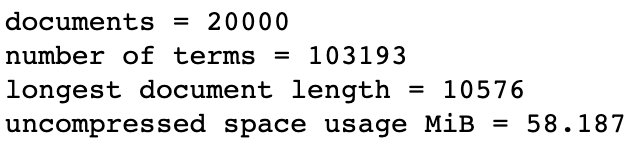
print("documents = {}".format(invindex.num_docs()))
print("number of terms = {}".format(invindex.num_terms()))
print("longest document length = {}".format(invindex.max_doc_len))
print("uncompressed space usage MiB = {:.3f}".format(invindex.space_in_bytes() / (1024.0 * 1024.0)))

https://ithelp.ithome.com.tw/upload/images/20190910/20118683M33bBiVsCI.png

在 Windows 架設 Redmine 專案管理安裝

  Redmine   是一套 Web 介面的專案管理平台,經同事推薦便試著安裝起來試試,試用的過程由於能夠與   Subversion   完美結合,所以看起來很能夠彌補公司裡 SVN 專案缺乏專案控管與議題追蹤的問題,由於   Redmine   安裝步驟有些麻煩,所以不得不...